Christmas Candy Cane Doodle: A Festive Font for Holiday Designs
When the holiday season approaches, the pressure to create visually distinct and emotionally resonant designs increases for every creative professional. If you are looking to break away from the standard serif font or the overused sans serif font options that dominate corporate holiday cards, the Christmas Candy Cane Doodle offers a refreshing alternative. This typeface is not just a collection of letters; it is a comprehensive design asset that infuses the whimsy and joy of the holidays directly into your typography. By utilizing the unique capabilities of modern typography, specifically color font technology, this typeface allows you to achieve complex, festive looks with a single keystroke.
The Visual Magic of a Color Font
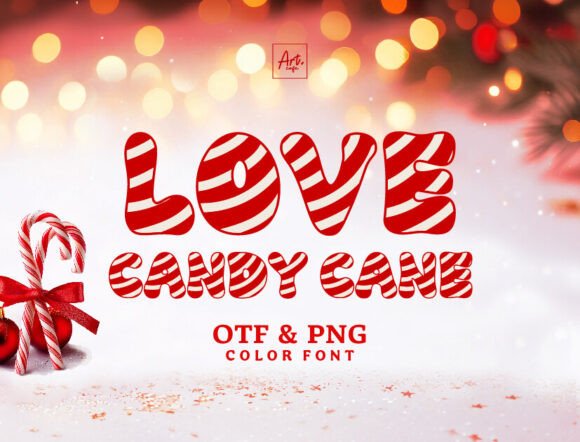
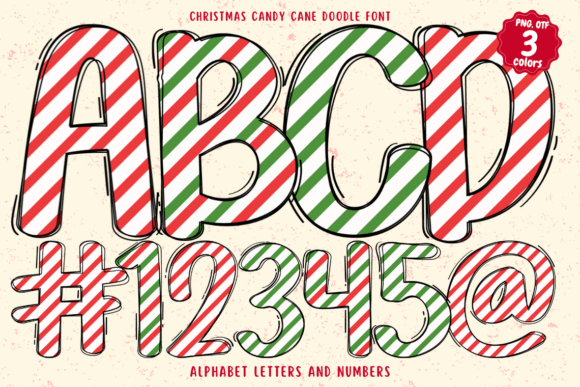
The defining feature of the Christmas Candy Cane Doodle is its status as an OpenType-SVG color font. Unlike traditional vector fonts that are monochromatic by default, this technology embeds full color and texture data directly into the font file. Visually, the characters appear as if they were drawn using actual peppermint candy canes, complete with red and white striping, realistic shadows, and highlights that mimic the glossy surface of sugar.
This creates a premium font experience that feels handcrafted. The personality of the typeface is undeniably playful and energetic, featuring doodle-style elements that suggest movement and fun. It moves beyond the rigidity of standard graphic design tools, offering a creative font solution that looks like high-end illustration work. For designers, this means you can add a layer of texture and depth to your brand identity or holiday campaign without spending hours manually adding effects in Adobe Illustrator or Photoshop. The visual appeal lies in its ability to evoke nostalgia while maintaining a crisp, high-resolution appearance suitable for both digital and print media.
Strategic Applications for Marketers and Designers
Choosing the right typeface is about more than just aesthetics; it is about context and audience. The Christmas Candy Cane Doodle excels in environments where you need to capture attention immediately and convey a sense of celebration. It is an ideal choice for display font usage, meaning it works best for headlines, sub-headers, and large-scale text rather than body copy.
For packaging design, particularly for bakeries, confectioneries, or small businesses selling seasonal goods, this font instantly communicates the product's nature. It serves as a visual shorthand for sweetness and holiday tradition. In the realm of social media graphics, where scroll-stopping power is essential, the textured, colorful nature of the font helps posts stand out in a crowded feed. It is equally effective for creating engaging student activities in educational settings or designing festive invitations for holiday parties.
However, as an experienced brand strategist, I recommend evaluating the tone of your specific project. If you are designing for a luxury brand that requires a minimalist, serious aesthetic, a candy-themed font might dilute your message. But for entrepreneurs and bloggers aiming for a friendly, approachable, and joyful vibe, this font aligns perfectly with those values. It is particularly useful for small business owners who want to create a high-impact logo design or seasonal banner without the budget for custom illustration.
Technical Compatibility and Readability
One of the most critical aspects of using specialized fonts is understanding the technical requirements. The Christmas Candy Cane Doodle is highly compatible with professional design software, including Adobe Photoshop, Illustrator, and Inkscape. It is also functional in Silhouette Studio, making it a versatile tool for crafters working on physical products like t-shirts or decals.
However, it is important to note the limitations regarding cutting machines. Because the font relies on complex SVG data to render the candy cane texture, it is not compatible with Cricut machines via standard OTF or TTF files. Cricut Design Space typically flattens vector data in a way that strips away the color and texture, leaving you with a solid shape. For Cricut users, this requires a workaround, such as creating a "Print then Cut" image file in Photoshop before importing it to the machine.
Regarding readability, treat this font as you would any other script font or handwritten font. The intricate details of the candy cane texture can become muddy if the text size is too small. It is designed for impact, not for long-form reading. To maintain a professional visual hierarchy, pair this display font with a clean, neutral sans serif font for your body text. This font pairing strategy ensures that your design remains legible while the headers provide the festive flair.
Practical Tips for Implementation
To get the most out of this asset, consider these practical guidelines for your workflow:
- Background Selection: Because the font features red and white colors, avoid placing it on busy, multi-colored backgrounds. Solid dark colors like forest green, navy blue, or black make the candy cane texture pop, while white backgrounds can sometimes blend with the white stripes of the candy, reducing contrast.
- Kerning and Spacing: Decorative fonts often require manual adjustment of letter spacing (kerning). In your editorial design or poster layout, zoom in and ensure the letters are not colliding awkwardly, particularly with letters like 'o', 'a', and 'e' which may have intricate doodle details.
- Commercial Licensing: Before using the Christmas Candy Cane Doodle in a commercial capacity—such as selling merchandise or using it in paid client work—verify the license agreement. Most premium font foundries allow for a specific number of users or projects. Ensuring compliance protects your business and supports the type designers who create these unique design assets.
- Testing File Formats: Always test the font in your specific version of the software before starting a large project. While it is compatible with major platforms, ensuring your version of Photoshop or Illustrator supports OpenType-SVG is a necessary step to avoid frustration later in the design process.
Ultimately, the Christmas Candy Cane Doodle is a specialized tool designed to inject personality into seasonal projects. It bridges the gap between typography and illustration, offering a shortcut to high-quality, festive visual communication. Whether you are a content creator looking to spice up your YouTube thumbnails or a publisher